Saturday, 29 September 2012

Researching Target Audience 

"When I visited the kids’ library at  Houston Public Library last week, I learned 2 amazing things from children’s librarian Sandy Farmer: wii games were available for in-library checkout, and the library   would soon be lending out ipads   stocked with apps and games especially for kids. What a grand idea. I can vouch that kids under 10 find the  ipad absolutely engaging.   Not only has it become a permanent babysitter, it has caused endless number of fights about whose turn it is to play and which game to play and why can’t X play the 2 player version of the game.  Out of the first few words to come from their mouths when they see me, I can say with certainty that one of them will be “ipad”  followed with a question mark. I’m almost embarrassed to admit that I use the device mainly for catching up on RSS feeds."
(Nagle 2011)
"Over time I have downloaded a number of kids’ games – some cost money, but most of them were free. I haven’t really looked at the games themselves, but I  have paid  attention to which games are capturing their attention.   I have  two nieces ages 3 and 4 and two nephews aged 5 and 10. So I really have a good sense of what games are more likely to excite them. I have a bit of an educational background and have written about educational games here and here. Curiously though, I haven’t spent much time playing games (except for Wii Dance 2 – which I love). Mainly I like to see what games are engaging today’s youth and what kinds of narratives they are concocting with their games. For example, I have noticed that my nephew really gets into Will Wright’s Spore (and even though it isn’t educational per se, it does a good job of conveying the basic sequence of evolution and how societies progress and regress.  On the Playstation, not only will my nephew learn about longer narratives like Harry Potter and Star Wars by playing the games, he will gleefully recount his adventures to anyone willing to listen. So these  games can have a verbal component… plus they can drive kids to the original source material…always a good thing."
(Nagle 2011)
"Ipad games are much less ambitious, but more intuitive. 3 out of the 4 children I deal with don’t even know how to read, and yet they managed to get through the menus and figure out the rules – something which amazes me to no end. I think there is value in letting kids play game just for the fun of it, but it would help if the games stressed some learning domain or made use of some cognitive skill. About 2/3 of the titles are free or Lite versions, and 1/3 are commercial apps. I’ll indicate if I remember whether they are free or cost money."
(Nagle 2011)

Nagle, R. (2011). Learning Games, Apps & Ebooks for Kids on the Ipad.Available: http://www.imaginaryplanet.net/weblogs/idiotprogrammer/2011/01/learning-games-apps-ebooks-for-kids-on-the-ipad/. Last accessed 29th Sep 2012.

http://www.imaginaryplanet.net/weblogs/idiotprogrammer/2011/01/learning-games-apps-ebooks-for-kids-on-the-ipad/

Questions to Ask Yourself When understanding your target audience 

The below list of questions will help you to fully explore the demographic and psychographic makeup of your audience.
  • Are they male/female?
  • How old are they?
  • Where do they live?
  • Do they have children?
  • Are they married?
  • Where are they when they use the app?
  • Do they love a competitive app? Why?
  • What do they do?
  • What do they have in common?
  • Why are they interested in the topic?
  • Who are they trying to impress?
  • Who impresses them?
  • What are their biggest fears?
  • What are their biggest hopes?
  • What Internet tools do they use most every day?
  • What Internet tools do they not use ever?
  • What drives my target to make decisions?
  • Can they afford my app?
  • Can I reach them with my app? Are they accessible?
  • Are there enough people in your target to be profitable?
  • How does your idea resonate with your audience on an emotional level?
  • Do you need to break your target up into niches?
(Gordon 2010)


Gordon, J. (2010). Understanding Your App’s Target Audience.Available: http://mobile.tutsplus.com/tutorials/mobile-design-tutorials/iphone-design-101-understanding-your-apps-target-audience/. Last accessed 29th Sep 2012.


Wireframing and Paper Prototyping

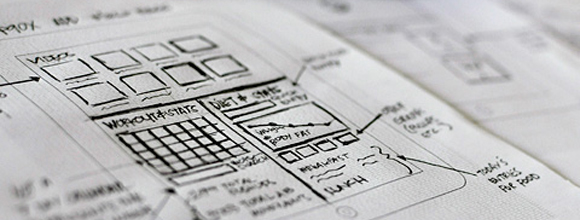
There has been a decent amount of discussion in the user experience community around the necessity of wireframing in web design these days, and I began to wonder “does this apply to mobile?” Are wireframes just a billable design deliverable to let the client to know we’re “working”? No, I think it is more than that. Wireframing and paper prototyping is definitely evolving as user’s online prowess and tastes become more refined, but this practice is still a very valuable component in mobile design.(Gordon 2010)

Paper Prototyping Comes First

In my experience, there is a vast difference in the form and function of wireframes versus paper prototypes, even though the terms may be used interchangeably. In my mobile design process, the first thing that happens after we figure out who is using the app and how, is paper prototypes -NOT wireframes.(Gordon 2010)
There are some who claim “paper is dead” and tout the benefits of digital prototyping. Others argue thatpencil and paper stregthens design. Personally, I come up with more fluid layouts when I am not in front of my computer. However, we’re all individuals, with different preferences and ways of thinking. Maybe you can be just as creative in front of your computer; it’s something each designer has to figure out for themselves!(Gordon 2010)
One thing that I love about offline paper prototyping is the speed at which you can iterate design. I use screen-sized sticky notes that can quickly be pulled off, reworked, rearranged etc. Once a flow has been established for the app, it’s time to nail down the on-screen elements in a wireframed version.(Gordon 2010)


1. Focus on the Primary Task

The first thing to do before you even think about putting pen to paper is to ask yourself this question: what is your app’s primary task? Specifically write down:(Gordon 2010)
(Your differentiator) (Your solution) for (Your audience).


2. Create Use Case Scenarios

Once you’ve defined your primary task, you’ve probably also put some thought into who wants an app that performs this task! Use cases are the BEST way to get the paper prototyping process started. In this article, I talk about how I defined use case scenarios for our Doodle Bright app. I gave “my people” a name, an address, an occupation and a specific scenario when they might use an app like Doodle Bright.(Gordon 2010)
Here’s an example:
Jane is waiting in the doctors office for a 3 o’clock appointment with her 4-year old son, Chad. She brought her iPad just in case the wait is longer than expected and of course they’re stuck in the waiting room for a half hour before they are called. Jane passes the time by drawing trucks and trains with Chad while they wait for her appointment.(Gordon 2010)
In this scenario, Jane and Chad are playing with the app together, which means mom can prompt him on how to interact with different elements on the screen if he is unsure of the next step.(Gordon 2010)
Now let’s look at this example:(Gordon 2010)
Jane is in the carpool line to pick up her eldest from school. Chad is in the backseat, bored after a day of running errands. Jane hands her iPad to him with the Doodle Bright app launched. Chad knows which buttons to push because they are intuitive to a 4-year old.(Gordon 2010)
In this scenario, the controls have to be easily understandable for an unsupervised child. Does this alter the types of paper prototypes you create for this app? Heck yea it does! Now, instead of designing for mom and son, to have a wider appeal we see that the prototypes should primary be geared towards only the child.(Gordon 2010)
It may be obvious that an app like this would require “thinking like a child” but without this use case scenario to back up that claim, you may fall into the default “adult mode” of thinking about the design.(Gordon 2010)

3. Identify Mental Models

In her article about “the Secret to Designing an Intuitive Interface” Susan Weinschenk talks about how to match your design to what the user expects to see. The better you can do this, the more intuitive your interface will be.(Gordon 2010)

4. Check the Flow

I often find that I have a perfect flow defined for an app, and then I find something I’ve left out. Been there? It’s aggravating but one thing I’ve found that can head off a lot of “leaving outs” is thinking outside of the “perfect” scenario.(Gordon 2010)
An example from the Doodle Bright scenario is when Chad creates a totally awesome picture Jane wants to save and print, but he accidentally closes the app. Uh oh. What now? Did you account for an auto-save in your paper prototypes? I hope so!(Gordon 2010)

5. Find the Method that Works for YOU

As I mentioned before, everyone is unique and creative in their own way. You have to find a method that squeezes the most out of you. Paper prototyping is one of the most creative exercises in the app development process, you have to work on this in your “prime” hours, environment etc.(Gordon 2010)
Gordon, J. (2010). 5 Steps for Wireframing and Paper Prototyping Mobile Apps. Available: http://mobile.tutsplus.com/tutorials/mobile-design-tutorials/5-steps-for-wireframing-and-paper-prototyping-mobile-apps/. Last accessed 29th Sep 2012.

http://mobile.tutsplus.com/tutorials/mobile-design-tutorials/5-steps-for-wireframing-and-paper-prototyping-mobile-apps/

App Prototyping

Before opening Photoshop it can be handy to spend some time sketching out your idea first. This could be on a simple piece of paper or laid over an entire spread. This step all depends on your hand-drawn artistic abilities and how comfortable you feel.(Rocheleau 2001)
Illustrators will generally sketch out frames for each piece to an iOS application. These are also known as views and can immensely help the app developers down the line by having a contained set of templates.(Rocheleau 2001)

Rocheleau, J. (2011). Getting Started in iOS User Interface Design.Available: http://webdesignledger.com/tips/getting-started-in-ios-user-interface-design. Last accessed 29th Sep 2012.

http://webdesignledger.com/tips/getting-started-in-ios-user-interface-design

Example for iPod wire framing 


iCake wireframes from John Walker

Walker, J. (2011). iCake. Available: http://www.slideshare.net/mobilemags/icake-wireframes. Last accessed 29th Sep 2012.

http://www.slideshare.net/mobilemags/icake-wireframes

Friday, 28 September 2012

Fonts Suitable For Children's Books

  • Larger fonts in favour than small fonts - 14pts or larger
  • Larger is earlier to read and more attractive
  • San serif fonts preferred
(Bernard 2001)
"Generally the larger, 14-point font size was considered to be easier and quicker to read, as well as being more attractive and more desired to be used in schoolbooks. In addition, the Comic font type was perceived as being easier to read and more attractive, as well as being more desired to be used in schoolbooks than the other font types. Along with Arial, it was also preferred over the serif fonts for use in schoolbooks. Overall the 14-point Arial and the 12-point Comic was the most preferred font types."(Poole 2008)
12-point size14-point size
Times New RomanTimes New Roman
Courier NewCourier New
ArialArial
Comic Sans MSComic Sans MS
References 
Bernard, M, Mills, M, Frank T & McKown, J . (2001). Which Fonts Do Children Prefer to Read Online?. Available: http://www.surl.org/usabilitynews/31/fontjr.asp. Last accessed 28 Sep 2012.

Poole, A. (2008). Which Are More Legible: Serif or Sans Serif Typefaces?. Available: http://alexpoole.info/blog/which-are-more-legible-serif-or-sans-serif-typefaces/. Last accessed 28 Sep 2012.

http://www.surl.org/usabilitynews/31/fontjr.asp


Task to test this out

Choose 10 fonts and get the neighbors kids to pick their favourite out.

5 Serif

5 San serif 


I showed the serif and San serif fonts to 6 children in total ages from 3-8 years old. They all agreed that the San serif type face would be easier for them when learning to read.